1.2 Users and Roles
Creating New Users
Creating users are restricted to Global Admins. You must have this role/permission.
- Sign into your admin account
- On your Dashboard you will see a Users web part
- If you do not see the Users web part, click the settings cog in the bottom right corner to edit your Dashboard. The + allows you to add or remove web parts.
click on the green button "New User"

- Enter in the user information and Save. You can create a temporary password for the user and user can change that once they sign into their account.

- You can read more on User Management here to understand user roles and privelages.
Managing Users
Managing users are restricted to Global Admins. You must have this role/permission.
- Sign into your admin account
- On your Dashboard you will see a Users web part
- When you click on the Users web part you will see a table of users who are currently registered
- There are actions you can take with a current user with the icons
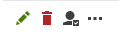
- Edit
- Delete
- Edit User Role
You can read more on User Management here.
You can change the User's Privilege Level, in the example below this user is set as a Global Admin
- You can also change a User's Role in the left navigation under "Roles"

- For Global Admins you will need to add CMS Desk Administrators and CMS Editors under their role.

- You can then Save and a user will be created